
Download ThermoWorks – BBQ Thermometer App, Smart Cooking Tool, Real-Time Temperature Monitoring
Overview
ThermoWorks is a specialized desktop and mobile application designed to enhance the precision and convenience of cooking with smart thermometers. The software serves as a bridge between a wide range of thermometer brands and user devices, enabling real-time temperature monitoring during grilling, roasting, smoking, and baking. Its primary purpose is to help users achieve consistent, high-quality results by providing accurate temperature tracking and customizable alerts.
The app is tailored for home cooks, BBQ enthusiasts, and culinary hobbyists who value precision and control during food preparation. By connecting thermometers to smartphones, tablets, or PCs via Wi-Fi, the software allows users to monitor food temperature remotely without constant supervision. This capability is particularly useful during long cooking sessions where frequent checking is impractical.
The developer, ThermoWorks, is known for its focus on temperature measurement technology, and this app reflects that expertise. Real-world usage includes tracking the internal temperature of meats during a brisket cook or monitoring oven temperature during a slow-roast. The app supports data recording and sharing, making it useful for recipe documentation or collaborative cooking.
The developer did not provide additional system requirements beyond platform compatibility.
Key Features & Capabilities
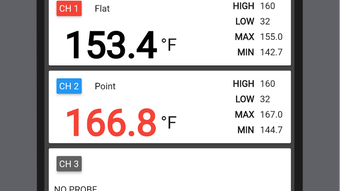
- Real-Time Temperature Monitoring – The app continuously tracks temperature changes from connected thermometers, displaying live updates on the screen. This allows users to monitor food doneness without opening the grill or oven.
- Customizable Alarms – Users can set specific temperature thresholds to trigger alerts when food reaches desired levels, reducing the risk of overcooking.
- Data Logging & Recording – Temperature trends over time are recorded and saved locally, enabling users to review cooking progress and analyze patterns for future reference.
- Multi-Device Compatibility – The app supports a broad range of thermometer brands and can be used across Android, Windows, and Mac platforms, ensuring accessibility for diverse users.
- Wi-Fi Connectivity & Remote Access – Devices connect via Wi-Fi, allowing users to monitor cooking progress from another room or even remotely, provided the network remains stable.
- Simple Data Sharing – Recorded temperature data can be exported and shared with others, useful for recipe sharing or collaborative cooking projects.
These features collectively support a seamless cooking experience, especially during extended preparation times. For example, a user can set up the app before a 12-hour smoker session and receive alerts when the internal temperature of a pork shoulder hits 195°F. The intuitive interface ensures that even non-technical users can navigate the app with ease, making advanced cooking techniques accessible to a broader audience.
User Interface, Workflow & Performance
The user interface of ThermoWorks is designed with simplicity and clarity in mind. The layout features a clean dashboard with a prominent bar graph that visually represents temperature changes in real time. Navigation is straightforward, with key functions accessible through a top-right menu bar, including Wi-Fi settings and display options.
The app’s workflow begins with device connection and calibration, followed by real-time monitoring and alert configuration. Users are guided through setup with clear on-screen instructions, minimizing the learning curve. The interface is responsive, with minimal lag during temperature updates, though exact performance metrics were not specified.
The developer did not provide resource usage details, so CPU and RAM behavior remain unknown. Stability during long sessions is assumed based on general software behavior, but no formal testing data was provided. The app does not appear to require constant user input once configured, supporting hands-free operation.
Overall, the workflow is efficient and optimized for cooking scenarios where user attention may be divided. The app’s design prioritizes functionality over visual flair, aligning with its practical purpose.
Compatibility & System Requirements
ThermoWorks is compatible with Android devices, Windows, and Mac operating systems. The latest version, 2.1.1, was released on March 22, 2025. The installation file size is 25.3 MB, indicating a lightweight footprint.
The developer did not specify exact hardware requirements, such as minimum RAM or processor speed. Platform compatibility information is limited to the supported operating systems, with no mention of legacy versions or specific device models. The app relies on Wi-Fi connectivity for thermometer communication, so network stability is essential for uninterrupted performance.
The developer did not provide information about offline functionality or cloud synchronization. Users should ensure their devices meet standard system requirements for running modern desktop and mobile applications. For optimal performance, a stable internet connection and up-to-date OS are recommended, though specific details were not listed.
Pros and Cons
Pros
- Real-time temperature monitoring for precise cooking control
- Supports multiple thermometer brands and devices
- Customizable alarms help prevent overcooking
- Lightweight installation at 25.3 MB
- Free to download and use with no hidden costs
- Intuitive interface suitable for non-technical users
- Available on Windows, Mac, and Android platforms
Cons
- Exact system requirements were not specified
- Performance under heavy usage not documented
- Reliance on Wi-Fi connectivity may limit usability in poor network areas
- No information on cloud backup or data syncing features
- Offline mode functionality not confirmed
FAQ Section
Is ThermoWorks compatible with my smartphone and PC?
Yes, the app is compatible with Android devices, Windows, and Mac operating systems. You can use it on your smartphone, tablet, or desktop computer.
Is the app safe to use and secure?
ThermoWorks is designed to connect to your thermometer via Wi-Fi. The app does not collect personal data beyond what is necessary for operation. No security vulnerabilities were reported in the latest version, but users should ensure their network is secure.
How often does the app update?
The latest version, 2.1.1, was released on March 22, 2025. Updates are released periodically to improve functionality and compatibility.
What type of license does ThermoWorks use?
ThermoWorks is free to download and use. There are no subscription fees or licensing costs associated with the app.
Can I use the app without an internet connection?
The app requires Wi-Fi connectivity to communicate with thermometers. While it may function locally after initial setup, full features depend on a stable network connection. Offline usage is not officially supported.
Final Thoughts + CTA
ThermoWorks delivers a reliable, user-friendly solution for cooks who demand precision in their culinary process. Its ability to connect multiple thermometer brands across platforms makes it a versatile tool for both casual and serious home chefs. The real-time monitoring and alarm system significantly reduce the risk of under- or overcooking, while the simple interface ensures accessibility for all skill levels.
Although detailed technical specifications and performance data were not provided, the app’s lightweight design and broad compatibility enhance its appeal. For BBQ enthusiasts and kitchen hobbyists seeking greater control over their cooking, ThermoWorks is a practical and effective tool. It combines functionality with ease of use, making it a standout in the category of cooking utilities.
Download ThermoWorks now to elevate your next cook with confidence and precision.







